

A practical reflection on Syntax, SharePoint, content curation and the changing role of the Knowledge Manager
One of the most time-consuming parts of Knowledge Management is often not creating knowledge; it is getting existing content into a shape where people can actually find, trust and reuse it.
Before content can become useful organisational knowledge, someone has to find it, understand it, clean it, categorise it, tag it, check it, and move it to the right place.
Recently, I explored an AI automation use case using Syntax with SharePoint. What interested me was not simply that AI could read documents. It was the possibility of using AI to take on the repetitive first layer of content curation—while keeping the Knowledge Manager firmly in the loop.
Check out the detailed PDF Overview...
The use case: from SharePoint folders to curated knowledge
Think about a SharePoint folder with hundreds of files accumulated over time: proposals, case studies, presentations, solution documents, meeting notes, templates, project material, drafts, and older content. Manually, a KM professional may need to open individual files, identify the content type, understand the subject, apply metadata, identify possible restrictions, and decide where the content belongs.
With an AI-assisted workflow, the model changes:
SharePoint folder → AI processing → classification and metadata suggestions → governance flags → human review → curated repository
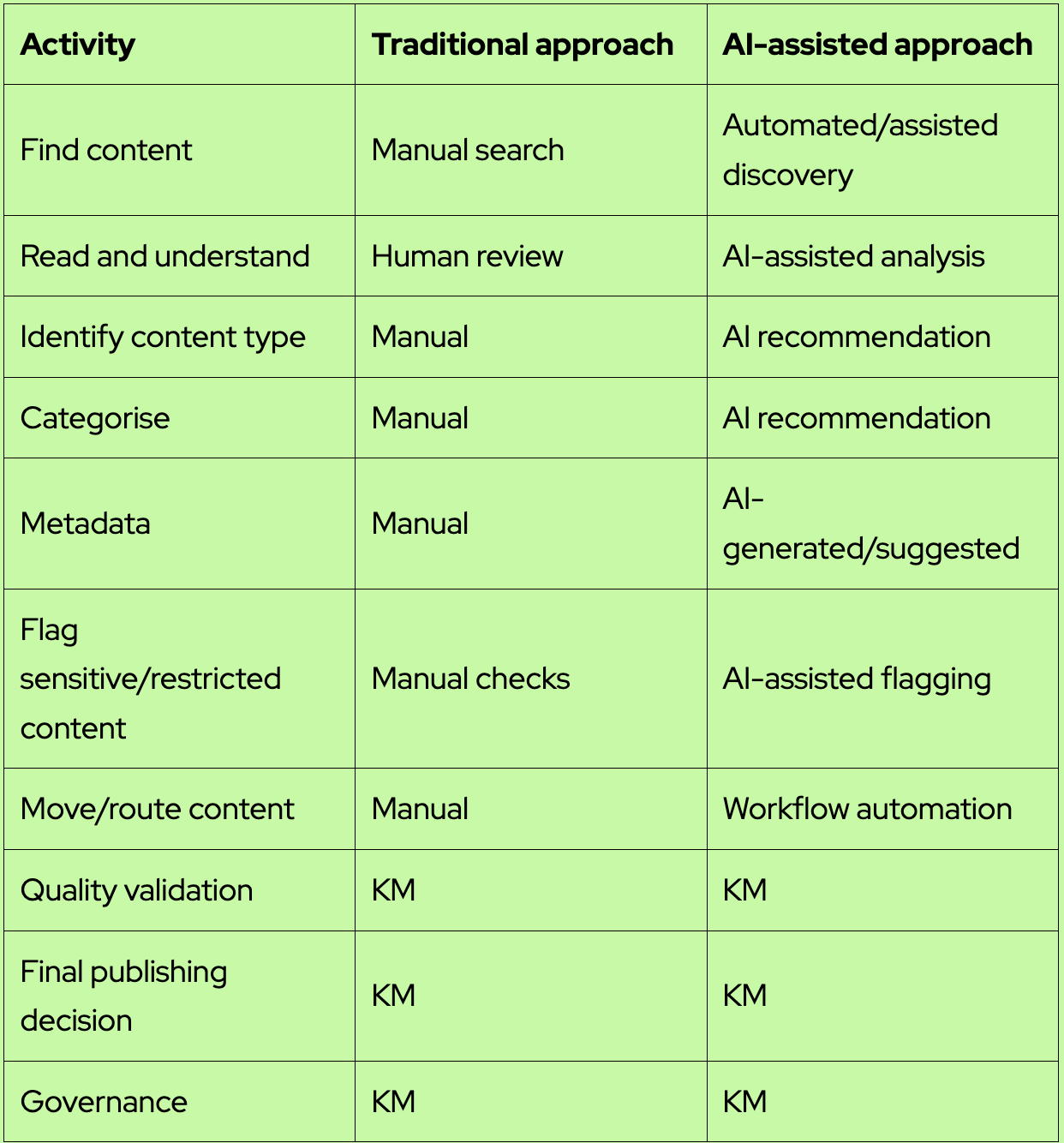
What AI can help automate
- Identify likely content type—for example, case study, proposal content, solution, SOP, meeting notes or thought leadership.
- Suggest categories based on the organisation’s taxonomy.
- Generate or recommend metadata such as practice, industry, geography, solution, technology and content type.
- Surface potentially duplicate, outdated or low-value content for review.
- Flag content that may contain confidential, client-sensitive, copyright-protected, or proprietary/IP material, subject to appropriate rules and validation.
- Route approved content to the appropriate SharePoint location through workflow automation.
Is it 100% accurate? No—and that is okay.
Based on my exploration, I would describe the initial output as roughly 70% accurate/usable rather than 100%. The exact result will vary with the quality of the taxonomy, instructions, examples, content, and workflow design.
For me, the important point is that AI does not have to be 100% accurate to create value. If it can remove a large part of repetitive discovery, sorting, classification, and tagging, it gives the KM team more time for the work that requires judgement.
AI is only as good as the KM context we give it
This is where the Knowledge Manager’s role becomes even more important. If we expect AI to recognise reusable content, confidential information, copyright restrictions or organisational IP, we have to define what those things mean in our environment.
The KM team provides the taxonomy, content definitions, metadata rules, examples, and governance principles. In other words, we are not simply asking AI to read content. We are teaching it how our organisation manages knowledge.
The model I believe works: AI + human review
I do not see the process as:
AI → Publish
I see it as:
AI → Process → Recommend → Flag → Human Review → Publish
The final responsibility for trusted knowledge should remain with the KM professional or designated content owner. AI can accelerate the work, but the human layer validates accuracy, relevance, reusability, confidentiality, IP, taxonomy, and content quality.
Beyond folders: connecting Forms, Power Automate and SharePoint
The bigger opportunity is to move from one-off content harvesting to continuous knowledge capture. For example, a simple Microsoft Form can capture meeting notes, project decisions, lessons learned, challenges, solutions, and reusable assets. Power Automate can trigger processing, and AI can structure and classify the information before it reaches the KM review queue.
A possible flow is:
Capture → Structure → AI classify/tag → Flag → KM review → Store → Reuse
A use case I see for bid and proposal teams
Bid teams work under pressure and repeatedly need similar knowledge: case studies, credentials, solution descriptions, previous responses, differentiators, delivery models, industry examples, and reusable proposal language.
If content is continuously classified and tagged, the bid team can move beyond searching for filenames and folders. The longer-term goal is to search by intent and meaning—for example, asking for examples of how the organisation helped healthcare clients improve customer experience through digital transformation.
This is where KM can shift from being a repository service to becoming a business enablement capability.
Manual vs AI-assisted curation
What happens to the Knowledge Manager?
This is the question AI naturally raises. My view is that the role does not disappear—it moves up the value chain.
- Less time on repetitive content administration.
- More time on knowledge strategy and architecture.
- More focus on taxonomy and governance.
- More attention to knowledge gaps and content lifecycle.
- More SME engagement and adoption.
- More time to measure reuse and business impact.
- A new responsibility for designing, testing, and improving AI-enabled knowledge workflows.
My biggest takeaway
AI does not replace the Knowledge Manager. It changes what the Knowledge Manager should spend time doing.
The future of KM may be less about manually managing every document and more about designing intelligent knowledge flows that can discover, classify, curate, flag, and route information—while humans provide the judgement, governance, and accountability.
Perhaps the future is not Human versus AI. It is Human + AI = Intelligent Knowledge Management.
We have spent years asking people to contribute knowledge and use repositories. The next opportunity may be to build systems that capture and process knowledge as part of the work people are already doing.
The question is no longer only, ‘Where is the knowledge?’ It is becoming, ‘How intelligently can we move knowledge to where it is needed?’
Also, I have attached my practical guide draft that I have been leveraging to automate content discovery, classification, tagging, governance, and routing.
_____________________



.png)
.png)
.png)
.png)