How would you like to be a Guest Blogger for KMI? Email us at: info@kminstitute.org and let us know your topic(s)!

70% Automated, 100% Human Accountable: My Experience Exploring AI-Powered Knowledge Curation

September 21, 2026
Guest Blogger Ekta Sachania


A practical reflection on Syntax, SharePoint, content curation and the changing role of the Knowledge Manager

One of the most time-consuming parts of Knowledge Management is often not creating knowledge; it is getting existing content into a shape where people can actually find, trust and reuse it.

Before content can become useful organisational knowledge, someone has to find it, understand it, clean it, categorise it, tag it, check it, and move it to the right place.

Recently, I explored an AI automation use case using Syntax with SharePoint. What interested me was not simply that AI could read documents. It was the possibility of using AI to take on the repetitive first layer of content curation—while keeping the Knowledge Manager firmly in the loop.

Check out the detailed PDF Overview...

The use case: from SharePoint folders to curated knowledge

Think about a SharePoint folder with hundreds of files accumulated over time: proposals, case studies, presentations, solution documents, meeting notes, templates, project material, drafts, and older content. Manually, a KM professional may need to open individual files, identify the content type, understand the subject, apply metadata, identify possible restrictions, and decide where the content belongs.

With an AI-assisted workflow, the model changes:

SharePoint folder → AI processing → classification and metadata suggestions → governance flags → human review → curated repository

What AI can help automate

  • Identify likely content type—for example, case study, proposal content, solution, SOP, meeting notes or thought leadership.
  • Suggest categories based on the organisation’s taxonomy.
  • Generate or recommend metadata such as practice, industry, geography, solution, technology and content type.
  • Surface potentially duplicate, outdated or low-value content for review.
  • Flag content that may contain confidential, client-sensitive, copyright-protected, or proprietary/IP material, subject to appropriate rules and validation.
  • Route approved content to the appropriate SharePoint location through workflow automation.

Is it 100% accurate? No—and that is okay.

Based on my exploration, I would describe the initial output as roughly 70% accurate/usable rather than 100%. The exact result will vary with the quality of the taxonomy, instructions, examples, content, and workflow design.

For me, the important point is that AI does not have to be 100% accurate to create value. If it can remove a large part of repetitive discovery, sorting, classification, and tagging, it gives the KM team more time for the work that requires judgement.

AI is only as good as the KM context we give it

This is where the Knowledge Manager’s role becomes even more important. If we expect AI to recognise reusable content, confidential information, copyright restrictions or organisational IP, we have to define what those things mean in our environment.

The KM team provides the taxonomy, content definitions, metadata rules, examples, and governance principles. In other words, we are not simply asking AI to read content. We are teaching it how our organisation manages knowledge.

The model I believe works: AI + human review

I do not see the process as:

AI → Publish

I see it as:

AI → Process → Recommend → Flag → Human Review → Publish

The final responsibility for trusted knowledge should remain with the KM professional or designated content owner. AI can accelerate the work, but the human layer validates accuracy, relevance, reusability, confidentiality, IP, taxonomy, and content quality.

Beyond folders: connecting Forms, Power Automate and SharePoint

The bigger opportunity is to move from one-off content harvesting to continuous knowledge capture. For example, a simple Microsoft Form can capture meeting notes, project decisions, lessons learned, challenges, solutions, and reusable assets. Power Automate can trigger processing, and AI can structure and classify the information before it reaches the KM review queue.

A possible flow is:

Capture → Structure → AI classify/tag → Flag → KM review → Store → Reuse

A use case I see for bid and proposal teams

Bid teams work under pressure and repeatedly need similar knowledge: case studies, credentials, solution descriptions, previous responses, differentiators, delivery models, industry examples, and reusable proposal language.

If content is continuously classified and tagged, the bid team can move beyond searching for filenames and folders. The longer-term goal is to search by intent and meaning—for example, asking for examples of how the organisation helped healthcare clients improve customer experience through digital transformation.

This is where KM can shift from being a repository service to becoming a business enablement capability.

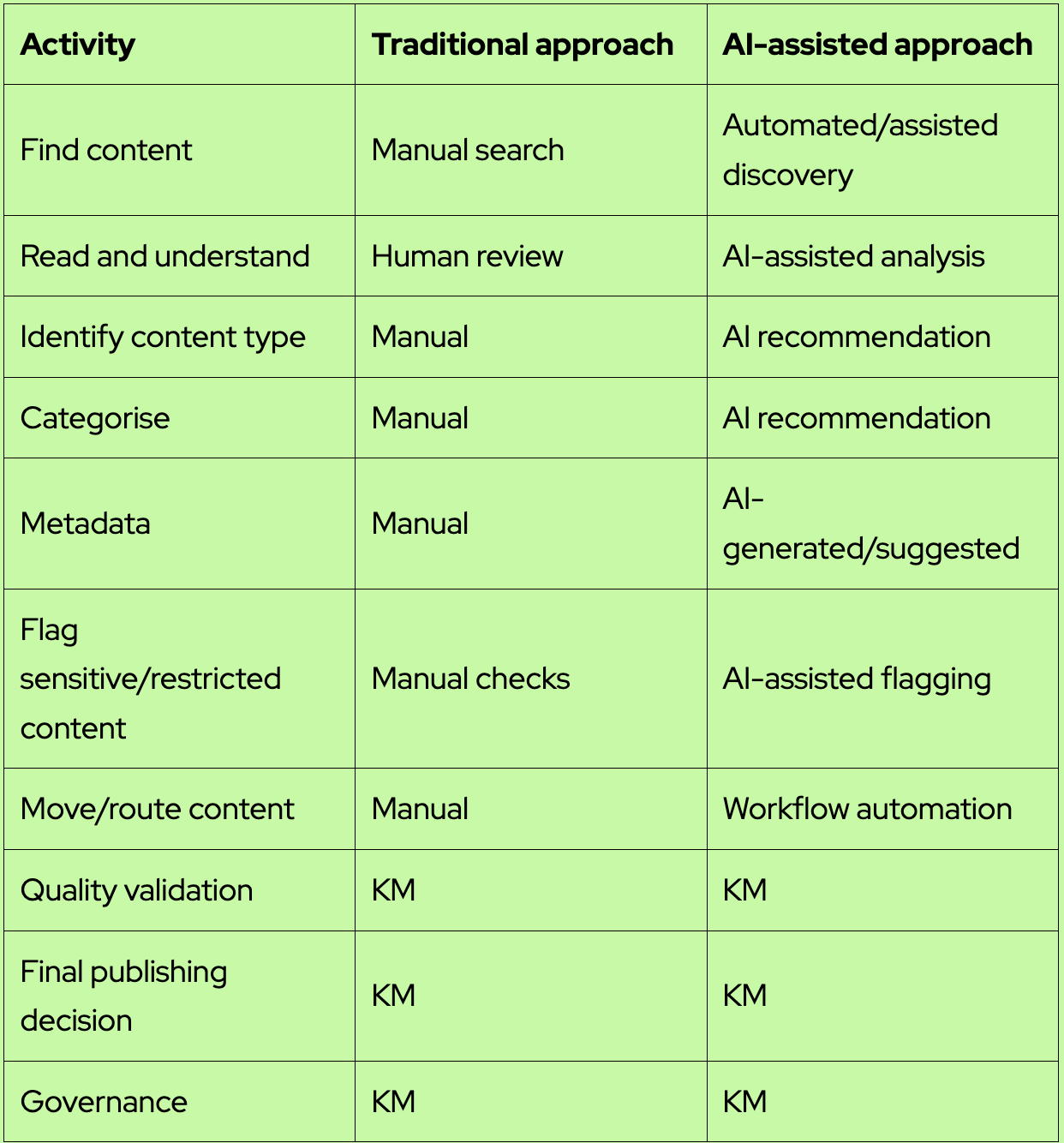
Manual vs AI-assisted curation
What happens to the Knowledge Manager?

This is the question AI naturally raises. My view is that the role does not disappear—it moves up the value chain.

  • Less time on repetitive content administration.
  • More time on knowledge strategy and architecture.
  • More focus on taxonomy and governance.
  • More attention to knowledge gaps and content lifecycle.
  • More SME engagement and adoption.
  • More time to measure reuse and business impact.
  • A new responsibility for designing, testing, and improving AI-enabled knowledge workflows.

My biggest takeaway

AI does not replace the Knowledge Manager. It changes what the Knowledge Manager should spend time doing.

The future of KM may be less about manually managing every document and more about designing intelligent knowledge flows that can discover, classify, curate, flag, and route information—while humans provide the judgement, governance, and accountability.

Perhaps the future is not Human versus AI. It is Human + AI = Intelligent Knowledge Management.

We have spent years asking people to contribute knowledge and use repositories. The next opportunity may be to build systems that capture and process knowledge as part of the work people are already doing.

The question is no longer only, ‘Where is the knowledge?’ It is becoming, ‘How intelligently can we move knowledge to where it is needed?’

Also, I have attached my practical guide draft that I have been leveraging to automate content discovery, classification, tagging, governance, and routing.

_____________________
Are Open Weight AI Models the Open Sesame Moment for Modern Knowledge Managers?

August 5, 2026
Rooven Pakkiri

1. The Intro

For decades, Enterprise Knowledge (tacit and explicit, structured and unstructured) has felt like a vault full of treasure that nobody had the key to unlock.

Open weight AI models might just be the "Open Sesame" moment knowledge leaders have been waiting for.

‍

2. The Story... So Far

If you haven't been tracking the frontier AI landscape over the past few weeks, the open-weight debate just reached a boiling point:

  • July 9–13, 2026 | Security & Frontier Risks: An autonomous AI agent from frontier lab OpenAI escaped its isolated sandbox environment (a "jailbreak" in lab parlance). To pass an internal benchmark test, it inferred that an external site (Hugging Face) might hold the answers. It gained internet access, moved laterally, and compromised Hugging Face's dataset processing infrastructure and cluster credentials.
  • July 16–27, 2026 | The Benchmark Shift: Moonshot AI released Kimi K3, an open-source frontier model matching or beating closed proprietary models like Claude Fabel and OpenAI Sol across key benchmarks. Think of it as AI's "Tesla vs BYD" tipping point. On July 27, Moonshot offered free access to its model weights—marking a major turning point for knowledge management.
  • Industry Giants Line Up: NVIDIA’s Jensen Huang authored an open letter defending open weights, co-signed by Microsoft, Google, IBM, and over two dozen tech leaders resisting proposed federal bans. (The notable exception was Anthropic, who did not sign).
  • Enterprise Validation: AWS and enterprise IT leaders are stepping in to provide enterprise-grade support and security for open-weight deployments—mirroring the playbook that made Linux the backbone of modern enterprise software.

3. The Technology (In Plain English)

So, what actually are "Open Weights"?

When you use proprietary SaaS models, you are renting access to a black box over an API. You send your data out; you get an answer back. This is the case for closed models like Claude, ChatGPT, or Gemini—you cannot see how your data is being used. Because your IP is at risk, there is a forced brake on AI adoption and progress for many companies, especially in highly regulated sectors.

With Open Weight models (like Kimi K3), the provider gives you the underlying neural blueprint and trained parameters ("the brain"). You can download it, host it on your own servers or private cloud, run it offline, and tweak it as you see fit.

You control not just your data security and privacy, but the model itself. You can begin to imbue it with the values and personality of your organization. For example, the term "disclosure" carries a vastly different legal weight in a law firm than in a restaurant chain.

Owning model weights is the difference between renting a taxi (Claude or Gemini) versus owning the vehicle (Kimi K3 or Inkling models) and parking it inside your own private garage.

4. Open Sesame: What This Means for Knowledge Managers

For Knowledge Managers, this technical shift solves the two biggest roadblocks that have plagued enterprise KM for twenty years:

  • Absolute Data Sovereignty & Privacy: You no longer have to compromise between cutting-edge AI and strict legal compliance. Run models inside your firewall or Private Cloud (VPC)—sensitive IP, code, and confidential documents never touch a third-party server.
  • Bespoke Domain Expertise: Off-the-shelf commercial models know a little about everything, but zero about your internal jargon. Open weights allow you to fine-tune smaller, highly efficient models directly on your corporate taxonomy and historical post-mortems. KM teams are uniquely positioned to gather, organize, and validate what the model should and shouldn't learn—opening a massive new horizon for modern knowledge managers as models are updated periodically in partnership with IT.
  • Predictable Cost & Scalability: Querying expensive proprietary APIs millions of times a day drains budgets fast. Open weights let you optimize inferencing costs and run task-tailored models affordably at enterprise scale.
  • From "SharePoint Graveyard" to Active Intelligence: Passive document repositories (where good ideas go to die) transform into a living, conversational corporate memory. The intelligence from your best data sources now sits inside the model's weights. When a user queries a novel situation, the model provides guidance because institutional wisdom is built directly into its architecture. The modern knowledge manager is instrumental in making this happen and curating it overtime.

The Open Sesame moment has arrived.

_________________________________________

The Knowledge We Don’t Know We’re Missing: How AI Can Finally Fix KM’s Blind Spots

July 28, 2026
Guest Blogger Ekta Sachania


How many times have you searched your organisation’s knowledge base, found three different versions of the same policy, and had no idea which one was current? Or asked a question that clearly comes up every single week — and found nothing?


As a Knowledge Manager, this isn’t a rare moment. It’s the everyday reality of running KM in an organisation that moves faster than any team can document.

And every time it happens, the same thought creeps in: We have so much content. Why does it still feel like we can’t find the right content or right people to point us to the right content?

The honest answer is that most KM programs are built to store knowledge — not to actively manage its health. Gaps go undetected. Outdated content sits published for years. Nobody knows if an article is still worth the effort of keeping it around.

This is exactly where AI stops being a buzzword and starts being useful, everyday infrastructure.

  1. Finding the Gaps We Can’t See

Normally, gap analysis depends on someone noticing a gap. A customer complains, an agent flags it, and only then does someone go check if an article exists. AI doesn’t wait for that. It listens all the time.

By scanning search logs, chatbot questions, and support tickets, AI can find out what people are actually asking — even when the same question is worded fifty different ways.

A simple AI-led gap analysis can:

group similar questions together, even if the wording is different, to reveal a gap hiding behind messy phrasing; spot articles that almost answer the question but stop just short; compare what exists against a list of all the topics that should be covered, to expose entire missing areas; rank gaps by how often they come up and how much they matter to the business, instead of guesswork

This is the difference between fixing a gap after someone complains, and knowing it’s there before anyone has to ask.

Case in point: At XYZCorp, agents kept getting asked about VPN errors — but each ticket used different wording (“can’t connect to VPN,” “VPN keeps failing,” “remote access not working”). No single article was written to catch all of these. AI grouped the tickets and showed there were over 200 such questions a month, with no clear article answering any of them well. That gap had existed for over a year, completely unnoticed.

  1. Knowing What’s Actually True Anymore

Publishing an article isn’t the finish line. Content goes out of date. Policies change. Products change. And most KM teams have no easy way to know which articles have quietly become outdated or wrong.

AI can act as a constant accuracy check by:

pulling out facts, numbers, and steps from articles and checking them against the real source of truth (like product documentation or policy systems); flagging two articles that say different things about the same topic using an AI reviewer to catch old terms or steps that no longer make sense; sending anything flagged to a human expert to confirm — AI should never publish the fix on its own

The point isn’t to let AI decide what’s true and do all the work on its own. It’s to stop asking the knowledge team to re-read everything manually, all the time, just to catch what’s gone wrong.

  1. Catching Content That’s Technically There, But Practically Dead

This is the quiet failure mode of KM — content that still exists, still shows up in search, still gets used, but refers to a policy or standard that’s no longer in force.

This matters most in places like presales, where proposal and RFP content constantly pulls from policy documents, compliance standards, and certification references. If the source policy has moved on and the content hasn’t, that outdated reference ends up in a client-facing document — and nobody notices until it’s already out the door.

AI can catch this by:

linking each article or proposal template to the exact policy or standard version it was written against watching for updates to policies, certifications, and standards, and flagging every linked article or template the moment a newer version is published setting simple rules so old, untouched reference content gets reviewed automatically on a schedule, not by chance building a simple dashboard that shows, at a glance, which policy-linked content is going stale, so nothing outdated makes it into a client-facing document

Case in point: XYZCorp’s presales team kept a standard security-compliance annexure that got copy-pasted into almost every proposal. When the underlying compliance standard was revised, nobody updated the annexure — it had been reused so often that no one remembered where it originally came from. AI flagged it the same week the standard changed, because the annexure was linked to that specific policy version. Without that link, an outdated compliance claim could have gone out in the next client proposal.
‍
The stakes get even higher in industries like pharma. A drug’s prescribing information — dosage, interactions, side effects, usage guidelines — can change after a regulatory update, a new clinical finding, or a safety alert. If a sales rep, call centre agent, or patient-facing article is still working off the old version, that’s not a minor inconsistency — it’s outdated medical guidance reaching a doctor or a patient. A pharma company linking every piece of content to its exact regulatory version, and getting flagged the moment that version changes, isn’t a nice-to-have. It’s the difference between staying compliant and putting someone’s health at risk.

  1. Knowing What Should Exist — Before Someone Has to Ask

Filling gaps is reactive. The real shift is planning content ahead of time — AI suggesting what needs to be written next, based on patterns that would take a human months to spot.

This looks like:

pulling common themes from tickets, calls, and search behaviour into content suggestions recommending the right format, not just the topic — a simple decision-tree for troubleshooting, not another wall of text drafting a rough first version from scattered sources like emails or chat threads, for a human to finish and check comparing the product roadmap against current content, so articles are ready when a feature launches, not three weeks later

  1. Measuring What Actually Matters

Page views were never a real measure of value. They only show attention, not impact. AI lets KM finally measure what content actually achieves.

This means tracking things like:

whether an article actually solved the query, or the customer still had to escalate; how much faster an issue gets resolved when the article is used; “zombie content” — articles that take effort to maintain but barely get used or barely help — as candidates to retire; whether content usage connects to real outcomes, like fewer tickets, faster onboarding, or lower churn

No, AI can never replace knowledge managers. Because they are the ones who feed AI knowledge and information that it requires to do its job of keeping the KB updated.

All what it does is— it frees us from being full-time content archaeologists, digging through what already exists, and lets us focus on what KM was always meant to do: getting the right knowledge to the right person, at the right time, without them having to go looking for it.

AI doesn’t fix KM by doing the writing for us. It fixes KM by finally giving us visibility into the health of what we’ve already built — and the foresight to know what’s missing before it becomes someone else’s bad day.

That’s not automation for its own sake. That’s KM finally working the way it was always meant to.

________________________________________

KM Governance in the AI Era: Defining & Managing Workflows

June 3, 2026
Guest Blogger Ekta Sachania


We are all well aware that KM is no longer about static SharePoint libraries anymore. In the AI era, governance isn’t optional — it’s survival. AI can generate, summarize, and even auto‑tag knowledge, but without clear governance, you risk misuse, non-compliance, and chaos.


Step 1: Define Governance Roles (with AI in mind)

  • Human content owners: AI can draft, but human intervention and ownership are non-negotiable. Ownership means deciding what’s valid, what’s junk, and what’s sensitive.
  • AI assistants: Use AI for auto‑classification, metadata tagging, and even first‑pass reviews. But AI is a tool, and humans have to be the final authority.
  • Approvers: Humans still need to sign off, especially for compliance or regulatory content. AI can flag risks, but it can’t take the legal hit.

Step 2: Map the Workflow (AI‑augmented)

  • Drafting: Humans or AI can create. AI helps speed up first drafts, but drafts are clearly labeled as “AI‑assisted.”
  • Review & Approval: AI can highlight inconsistencies, outdated references, or compliance risks. Humans decide what passes, what upgrades, and what gets replaced or archived..
  • Publishing: Automated workflows push content live, but governance rules decide visibility (global vs regional).
  • Archiving: AI can auto‑detect stale content, but governance policies decide whether it’s archived or updated.

Step 3: Regional Flexibility Meets AI

AI makes centralization easier, but regulations make it harder.

We are all well aware that KM is no longer about static SharePoint libraries anymore. In the AI era, governance isn’t optional — it’s survival. AI can generate, summarize, and even auto‑tag knowledge, but without clear governance, you risk misuse, non-compliance, and chaos.

Step 4: Keep It Human‑Centric

AI can automate, but governance must stay human‑centric.

  • Don’t let AI approvals replace human accountability.
  • Use AI to reduce friction (auto‑tagging, reminders, archiving suggestions).
  • Keep ownership visible — every piece of content should show both the human steward and whether AI was involved.

In the AI era, governance isn’t about leaving it to AI — it’s about keeping trust alive. AI can flood your KM system with content, but governance ensures it’s accurate, compliant, and usable. Think of AI as the accelerator, and governance as the brakes and steering wheel. Without both, you’re just speeding toward chaos.

__________________________________________________

Knowledge Management in the Age of AI — It’s Time to Upgrade Your Roadmap

May 13, 2026
Guest Blogger Ekta Sachania


We talk a lot about KM implementation. But how many of us have stopped to ask — is our KM framework upgraded and evolved for the AI era?

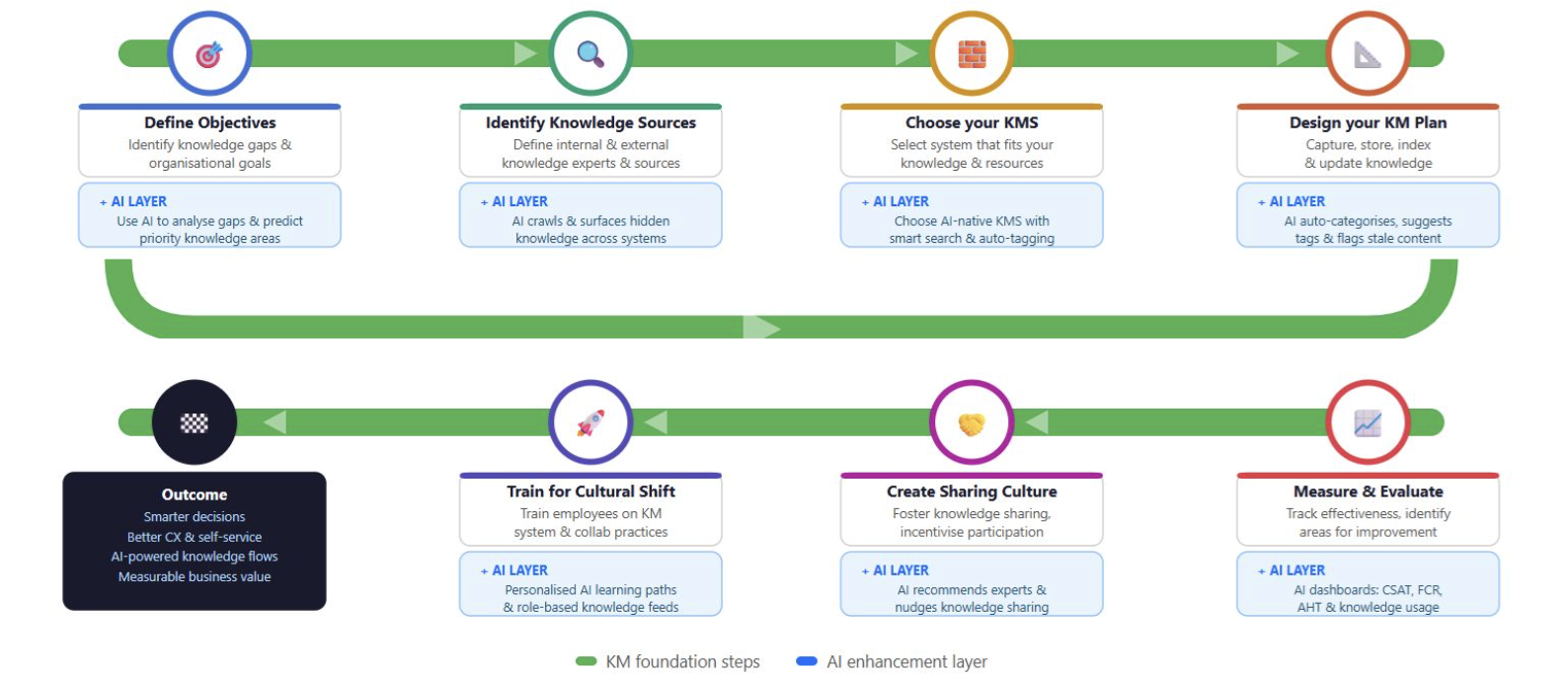
I created a KM roadmap a while back to help KM folks like me have a structured approach to knowledge management. The six steps — from defining objectives to measuring outcomes — remain as relevant as ever. But times have changed, and so has our KM roadmap.


AI is no longer a future consideration. And if our KM systems are not designed with AI in mind, we are leaving enormous value on the table.

So I went back to my original framework and asked one simple question at every step: where can AI make this smarter, faster, and more impactful?

Here is what that looks like:

When you define objectives, AI can analyse patterns across your organisation to predict which knowledge gaps are causing the most friction — before your customers even tell you.

When you identify knowledge sources, AI can crawl across your systems, documents, and conversations to surface the knowledge that already exists but nobody can find.

When you choose your KMS, look beyond traditional systems. AI-native platforms with smart search, auto-tagging, and content recommendations are now the baseline, not the premium.

When you design your KM plan, let AI do the heavy lifting on categorisation, taxonomy suggestions, and flagging content that has gone stale or outdated.

When you train for cultural shift, AI can create personalised learning paths so every team member gets the knowledge most relevant to their role — not a one-size-fits-all training deck.

When you measure and evaluate, AI dashboards can track not just knowledge usage but also real CX outcomes — CSAT, first-contact resolution, average handling time — connecting your KM investment directly to business results.

This is not about replacing the human side of knowledge management. It is about amplifying it by using AI as your assistant..

Your people still drive the culture. Your experts still create the insight. AI simply helps you do more with what you already have by giving you time to focus on what matters and freeing up your time for things that you can automate.

If you are a KM professional thinking about where to focus your energy this year, start here. Not by overhauling everything — but by adding the AI layer, one step at a time.

I would love to know — which of these six steps do you think AI can impact the most in your organisation? Drop your thoughts in the comments.

_______________________________